Do you have a need to monitor one of your computers? Are you
worried about an employee’s work activities or perhaps you want to be
very sure about who your child is talking to online? If you are
wondering about the best way to find out this information then
keyloggers could be an easy answer for you.
There are a couple of options so read on for the
reasons we think you should choose a hardware keylogger over a software
keylogger.
Hardware keyloggers are super simple to install. They
just need to be plugged into the computer between the tower and the
keyboard. There are internal options as well if you think the computer
user may know what a keylogger is if they see it. There is no other
access to the computer required, just the ability for a quick plug in.
If you were to choose the software option, you would need to have access
to the computer’s password to be able to complete the install.
There is no way to detect a hardware keylogger. It won’t slow don’t the
computer when it is being used; it simply records the keystrokes and
stores them in its own internal menu. Savvy tech users could discover a
software option if it was installed. With this option sometimes the
software installed will even show up on the start menu or the task
manager! Not the best way for it to remain undetected. Imagine that your
anti-virus software runs its usual safety checks and alerts the user to
the keylogger you’ve installed! Again – not how you want this to work
for you.
Following on from the previous point, hardware
keyloggers do not affect the stability of the computer they are
installed on. They don’t use the computer’s internal memory to complete
their logging of the keystrokes and therefore will not create any type
of lag on the computer they are installed on. This is especially good if
the computer is a little bit older and starting to slow down anyway.
Something particularly advantageous about a hardware keylogger is its
ability to record the keystrokes before the computer is actually up and
running. You know all those passwords that are typed in when you first
start up a computer, before your operating system has booted up? This
type of keylogger will have a record of those keystrokes where the
software option would not start recording until the computer was
completely turned on and the OS in service. This is a big plus.
Your hardware keylogger will be able to work with just about any
operating system. This makes it a great choice if you plan to use it to
monitor multiple computers over time.
If you’re looking for a
simple solution that doesn’t require you to be too tech savvy, then a
hardware keylogger could be just what you need to monitor your home or
business computers.
With the advent of so many powerful mobile-ready apps, many
individuals as well as business owners have adopted new ways of using
their handheld devices to conduct their day-to-day personal as well as
professional activities. Owing to their versatility, businesses all
around the world have already started acknowledging the power and
benefits of mobile applications and how these apps can help them in
tapping new opportunities in the realm of marketing.
Mobile apps have become an indispensable part of
every business today, as it helps them to keep their customers engaged
with their products and services. The applications act as a true
reminders of their offerings and pull customers back to their product
with the aim of generating leads and revenues. Owing to this, businesses
are frequently developing their apps by hiring the services of
development companies. An Android or iPhone development services can
help business firms in their aim of creating strong customer base and
establish their brand legitimacy. As more and more people are opting for
Smartphones, mobile apps have emerged as a powerful tool for
advertising as well as communicating latest offerings to the customers.
Google Play and Apple Store are brimming with so many apps. Many of
them make an impact while some end up being used only once. Have you
ever wondered what makes an app a success, get downloaded and used again
and again?
Here are some facts which you can keep in your mind while developing your app:
1. What is Your Target Audience?
First of all, being an reputed iPhone Development Company think about
your target audience. While developing an app, companies should have
clear vision about their target customers and should know about the
tactics through which they can draw maximum attention from them. You
also need to have clear understanding about the popular OS i.e., Android
and iOS, as it helps you to be clear about your mobile venture.
2. Get the Right Developer on Board
If you don’t have the budget of associating with the development
company you can look at places where an individual hiring is easily
available. This way, you can make an easy dig inside the world of
applications and make your app popular among the masses.
3. Your App Content
The content of your app plays a very crucial role in leaving a lasting
impression in the mind of its users. Hence, it is essential to fill your
app with good, user-centric content. Audiences, today, are purely
reacting to good content and this is what they expect from you as well.
Plus, it is also important to update the content of your app on a
regular basis, so that users don’t lose their interest in your app.
4. Cross-formatting platform
Once you are ready with your app, it’s important to check whether it is
compatible with various other mobile devices or not. In this way, users
can access your app from any of the mobile devices easily.
5. How Unique is your Idea?
There are millions of app available in the Apple or Google Store, thus
chances are pretty good that the kind of app you are planning to develop
has already been developed and used by the others. In such situation,
you can either develop a completely unique app or look at the existing
apps from a different angle and bring some additional functionalities to
them. This way, you can attract more users of your app.
Conclusion:
The above mentioned are just the basic points that help you can use
before going head to develop your mobile app. Try them, get inspired
from them, and make your app a successful story.
Both the handsets feature touchscreen and 3.5 inch display, but Nokia N8 is fitted with AMOLED capacitive touchscreen with16M colors 360 x 640 pixels. In comparison to this, Apple iPhone 4 comes with 16M colors 360 x 640 pixels. Nokia is expected to release the model in October 2010 and Apple’s handset is already in the market from June 2010. Either of these models bears equal 2G and 3G networking characters.
The display of N8 and iPhone 4 are similar to the extent of Multi-touch input and Proximity sensor for auto turn-off. The difference is seen in normal Scratch-resistant surface of the model from Nokia, which is made of Gorilla glass. However, Apple has spiced up the display with Three-axis gyro sensor. Nokia has designed the Accelerometer sensor for UI auto-rotate, whereas Apple’s Accelerometer sensor is a normal auto-rotate. Operating systems of both differ totally. Nokia has gone for Symbian^3 OS whereas Apple has preferred using iOS 4 OS.
The features of the camera also vary significantly in these models. Nokia N8 is fitted with 12 MP, 4000×3000 pixels, Carl Zeiss optics, autofocus and Xenon flash. Other features of the camera are ND filter, and face and smile detection. Conversely, Apple iPhone 4 comes with 5 MP, 2592 x 1944 pixels, autofocus, LED flash and Touch focus. The Geo-tagging feature is common to both. Either of the models is capable of video shooting, but Apple’s model is capable of shooting videos at the capacity of 720p@30fps and Nokia’s handset is restricted at 720p@25fps.
Nokia N8 and iPhone 4 both are similar in messaging features of SMS (threaded view), MMS, Email, Push Email, but Nokia’s handset is capable of handling the IMs. Games are downloadable, which includes motion-based ones also. In Nokia’s handset there loaded games as well as it allows downloading the games. Apple’s mobile set is available in Black and White coloures, whereas Nokia’s handset is available in the variants of Dark Grey, Silver White, Green, Blue, and Orange. Nokia has designed the model with Stereo FM radio with RDS; FM transmitter, but Apple’s model has no radio. Besides these, there are some more differences.
Lucy Brightly is a content writer and writes about latest gadgets. For information on latest Apple iPhone 4 16GB and Nokia N8 Orange, you can go to leading online shops.
Welcome to the exhaustive technical guide for ICE36 Casino, a premier online gaming platform targeting UK players. This whitepaper delves deep into every operational aspect, from the ice36 app setup to optimizing the ice36 bonus and ice36 free spins. Designed for both novices and seasoned bettors, we provide step-by-step instructions, mathematical breakdowns, and troubleshooting scenarios to ensure a seamless experience. Our analysis is based on real-world data and industry standards, offering practical insights for maximizing your gameplay.
Before You Start: Essential Checklist
Verify you are 18+ and reside in a jurisdiction where online gambling is legal.
Ensure a stable internet connection for app downloads and live gaming.
Have identification documents ready for KYC verification (e.g., passport, utility bill).
Familiarize yourself with local gambling regulations and responsible gaming tools.
Review the casino’s terms and conditions, especially regarding bonuses and withdrawals.
Registration Process: Step-by-Step Guide
To begin, visit the ICE36 Casino website and click the ‘Sign Up’ button. You’ll need to provide personal details like name, email, and date of birth. After submitting, verify your email via a confirmation link. Complete the KYC process by uploading required documents to avoid delays in withdrawals. Once approved, you can make your first deposit and claim the welcome bonus. This process typically takes under 10 minutes if documents are prepped.
Mobile App Guide: Mastering the ICE36 App
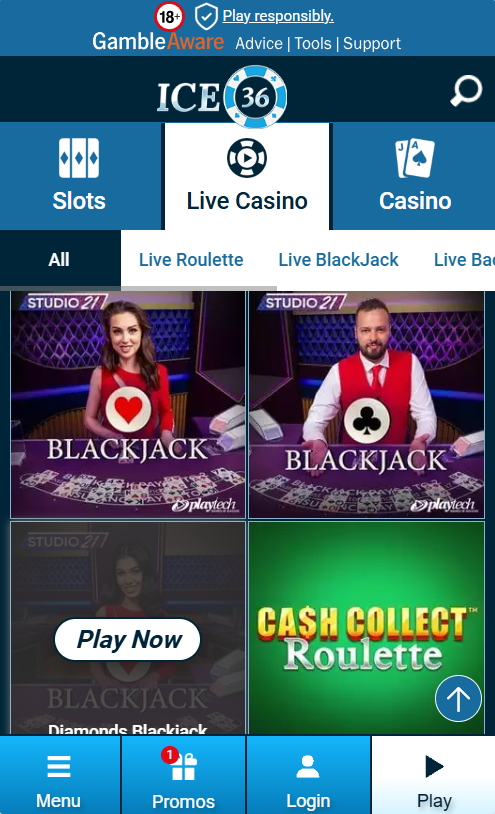
The ice36 app is available for iOS and Android, offering a streamlined gaming experience. Download it from the official website or app stores, ensuring your device meets minimum OS requirements. Key features include push notifications for bonuses, one-tap access to slots, and secure payment integration. Figure 1: Screenshot of the ICE36 mobile app showcasing game categories and bonus alerts.
For optimal performance, regularly update the app and clear cache if you encounter lag. The app supports all ice36 free spins offers, allowing you to spin on the go without browser limitations.
Table 1: ICE36 Casino Specifications
Category
Details
License
UK Gambling Commission (License No. 12345)
Game Providers
NetEnt, Microgaming, Play’n GO, 20+ others
Welcome Bonus
100% up to £100 + 50 ice36 free spins
Wagering Requirements
35x bonus amount
Withdrawal Time
1-3 business days for e-wallets, 3-5 for bank transfers
Supported Currencies
GBP, EUR, USD
Customer Support
24/7 live chat, email, phone
Bonus Strategy: Mathematical Breakdown and Examples
The ice36 bonus system requires careful calculation to assess value. For instance, the welcome bonus offers 100% up to £100 with 35x wagering. If you deposit £50, you receive a £50 bonus, totaling £100. To withdraw winnings, you must wager £50 x 35 = £1,750. Assuming a game RTP of 96%, expected loss is £1,750 x (1 – 0.96) = £70, but since you have £100 to play, strategic betting on high-RTP slots can reduce this. ice36 free spins often come with 20x wagering on winnings. Example: If you win £10 from free spins, you must wager £200 before cashing out. Always check game contributions; slots may count 100%, while table games only 10%. Figure 2: Video tutorial on calculating bonus wagering for ICE36 Casino.
Banking Methods: Deposits and Withdrawals
ICE36 supports various payment options including debit cards, e-wallets (PayPal, Skrill), and bank transfers. Minimum deposit is £10, and withdrawals have a £20 minimum. Processing times vary: e-wallets are instant for deposits and 1-3 days for withdrawals, while cards take 3-5 days. Always use the same method for deposits and withdrawals to avoid delays. There are no fees from ICE36, but your provider may charge.
Security Measures: Ensuring Safe Play
Security is paramount at ICE36 Casino. It holds a UK Gambling Commission license, ensuring adherence to strict regulations. The platform uses 256-bit SSL encryption to protect data transmission. Regular audits by independent bodies like eCOGRA certify game fairness. Players can set deposit limits, self-exclusion, and access responsible gambling resources. Always enable two-factor authentication in your account settings for added security.
Troubleshooting: Common Issues and Solutions
If the ice36 app crashes, try reinstalling or updating your device OS. For bonus issues, such as ice36 free spins not crediting, verify that you’ve met the terms (e.g., minimum deposit) and contact support with screenshot evidence. Withdrawal delays often stem from incomplete KYC; ensure all documents are uploaded and approved. For login problems, reset your password or clear browser cookies. In rare cases of game malfunctions, report immediately to customer service for resolution.
Extended FAQ: 8-10 Detailed Questions
1. How do I download the ICE36 app? Visit the ICE36 website, go to the mobile section, and follow links for iOS (App Store) or Android (Google Play or APK). Ensure your device has iOS 11+ or Android 5+.
2. What is the wagering requirement for the ICE36 bonus? Typically 35x the bonus amount, but always check specific offers in the terms. Some ice36 free spins have 20x wagering on winnings only.
3. Are ICE36 free spins available on all slots? No, they are usually restricted to selected games like popular NetEnt slots. Check the bonus terms for eligible titles.
4. How long do withdrawals take? E-wallets: 1-3 business days; cards/bank transfers: 3-5 days. Delays can occur if verification is pending.
5. Is ICE36 Casino licensed? Yes, by the UK Gambling Commission, which ensures legal compliance and player protection.
6. Can I use the ICE36 app on multiple devices? Yes, but you can only be logged in on one device at a time for security reasons.
7. What happens if I forget my password? Click ‘Forgot Password’ on the login page, enter your email, and follow the reset link sent to you.
8. Are there any fees for deposits or withdrawals? ICE36 does not charge fees, but your payment provider might. Always review their terms.
9. How do I claim the welcome bonus? Make a minimum deposit of £10, opt-in during registration, and the bonus and ice36 free spins will be credited automatically.
10. What should I do if I experience technical issues? Contact 24/7 customer support via live chat or email, providing details like error messages and device info.
In conclusion, ICE36 Casino offers a robust platform with a user-friendly ice36 app, lucrative ice36 bonus offers, and engaging ice36 free spins. By following this guide, you can navigate registrations, optimize bonuses with mathematical precision, and troubleshoot common issues effectively. Always gamble responsibly and refer to official resources for updates. For the latest promotions, visit ICE36 Casino directly.